
MagicTable: Mouse Watcher
Velocity RaptorTravel & Local
4.7242.00 Reviews
- Version
- 1.0.17
- Installs
- 10.00K
- Age Rating
- Everyone
Screenshots
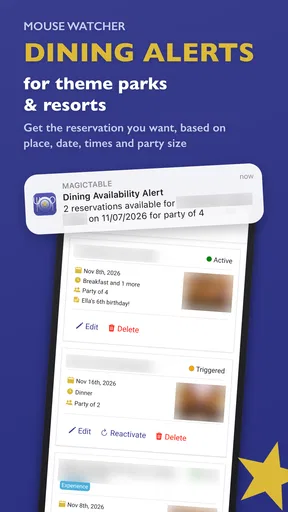
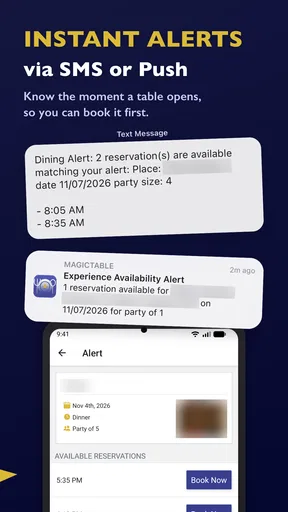

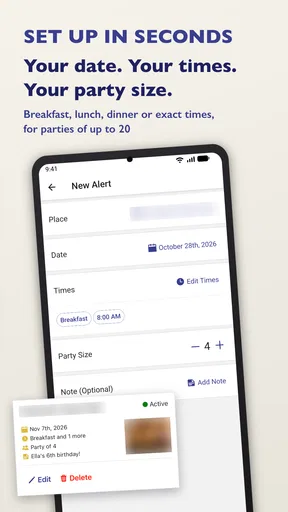




Our Review of MagicTable: Mouse Watcher
 Analysis by Appyee
I judge a reservation app less by how many places it lists than by how useful it is when plans are time-sensitive. MagicTable: Mouse Watcher is a travel and local app from Velocity Raptor, built around alerts for restaurant dining and activities. Its promise is practical: help people notice openings without spending the day refreshing reservation pages. That focus makes it most interesting to travelers and locals who have a particular experience in mind and some flexibility about when they go.
What the alerts are useful for
For a popular restaurant, the frustrating part is often not choosing where to eat but finding a suitable time. An alert-based tool can make sense when a preferred booking is unavailable and you would accept a cancellation or another opening. Rather than repeatedly checking several pages, you can use MagicTable to watch for opportunities and respond when a message arrives. The app’s store summary describes alerts delivered by SMS across more than 150 restaurants and activities, so the emphasis is on being notified rather than browsing an all-purpose travel guide.
That distinction matters. I would treat it as a companion to deciding where to go, not a replacement for checking menus, location, opening hours, accessibility details, or the venue’s own booking terms. A text alert can point you toward a possible opening, but it is still sensible to confirm the details before changing your plans. If you already have a reservation that works, there is little reason to add another layer; the benefit is greater when you have a specific target and can act quickly.
Readability and navigation
The name can suggest something playful, but the useful question is whether an alert service feels manageable in everyday use. I would approach it with a short, clear plan: identify the restaurant or activity you care about, decide which dates or times would genuinely work, and avoid monitoring options you would not take. That small bit of preparation can make alerts easier to interpret and reduce the temptation to chase every possible opening.
For someone comparing destinations, the app is narrower than a general travel search or map app. Those alternatives are better for discovering nearby places, comparing routes, or building a broad itinerary. MagicTable is more relevant after you already know what you want to book. I find that a useful division of labor: use a map or guide to choose a place, then use an alert-focused service only if timing is the obstacle.
The app is free to download and is rated for Everyone. Its average rating is 4.4 from around 1,100 ratings, with over 10,000 installs. Those figures suggest that it has found an audience, though ratings alone cannot tell you whether its coverage matches your destination or schedule. The current version is 1.0.17, and it requires Android 7.0 or later. If you use a device outside that range, this Android release is not a practical option.
Making it fit different abilities and situations
SMS can be a useful format for people who prefer a straightforward message over keeping an app open and watching a screen. It can also suit a day when you are moving between places and do not want to repeatedly check a booking page. At the same time, text alerts are only helpful if receiving and reading them is comfortable for you. People who rely on visual notification cues, use assistive technology, or need information in a different format should consider whether their phone’s usual text and notification settings make this workflow workable.
There is a practical motor trade-off, too. Responding quickly to an opening may involve unlocking a phone, reading a message, and completing a booking flow elsewhere. If rapid taps or switching between apps is difficult, an alert may create pressure rather than convenience. I would set expectations accordingly: use the service for opportunities you can realistically act on, and keep a slower, more dependable plan as a backup. The app should support your outing, not make the outing depend on winning a race against other diners.
For sensory comfort, a message may be less intrusive than repeated in-app prompts, but a text can still interrupt whatever you are doing. Reviewing the phone’s notification controls before relying on alerts is a sensible step. You can decide what kinds of interruptions work for you at home, at work, or while traveling. I would not assume that a message is urgent simply because it has arrived; check it when doing so is safe and convenient.
A realistic way to use it
Imagine planning a weekend dinner in a city you are visiting. You have one restaurant in mind, but the time you want is unavailable. Before setting up any watch, decide whether an earlier dinner, a later seating, or a different day would also work. That gives you a useful boundary: an alert is worth acting on only if the opening fits the trip rather than forcing you to rearrange everything around it.
If a message arrives while you are on a train or walking through a busy station, you may not be in a good position to book immediately. I would wait until I can read the details carefully and check the venue’s booking page, rather than tapping through while distracted. If someone else is traveling with you, agree in advance who will handle a possible booking and what alternatives are acceptable. That simple coordination helps avoid duplicate attempts or a last-minute decision that does not suit the group.
This workflow also clarifies when the app is not the right choice. If your schedule is fixed, you need a guaranteed booking, or you cannot respond during the day, an alert is not a substitute for securing a confirmed table elsewhere. Likewise, someone who wants broad restaurant recommendations or route planning will get more from a conventional travel app. MagicTable is best viewed as a targeted tool for people willing to trade certainty for the possibility of finding a better-fitting opening.
Coverage, costs, and sensible expectations
The selection spans restaurants and activities, which gives the service a wider use than dining alone. Even so, the number of places covered does not guarantee that a particular neighborhood, venue, or date will suit you. I would check whether the options relevant to an upcoming trip are represented before building plans around the app. For a destination with limited coverage, contacting a venue directly or checking its own booking channel may be more dependable.
Although the app is free to install, it includes in-app purchases ranging from $9.99 to $79.99 per item. I would look at the purchase details inside the app before paying and judge them against how often I expect to use the service. A one-off weekend trip and regular attempts to book sought-after venues are very different situations. The free download makes it possible to explore the basic proposition, but the presence of paid items means it is worth checking what a purchase actually provides rather than assuming every useful function is included.
There is also a timing trade-off built into any alert-based approach: an opening is only valuable if it appears when you can respond and still fits your plans. I would avoid treating notifications as a guarantee, and I would keep an acceptable alternative in mind. That is especially important for travelers with limited time in a city, families coordinating several schedules, or anyone who needs a particular meal time. An alert can improve your chances of spotting an option; it cannot make an unsuitable time convenient.
Who will get the most from it
I can see this being a good fit for people who are flexible, already know which restaurant or activity they want, and are comfortable acting on a text. It may also help a local planning a special meal who is willing to adjust the day or time if something opens up. If you enjoy finding an opportunity without constantly checking booking pages, a focused alert service can reduce that repetitive work.
I would skip it if you prefer to plan everything in advance and do not want to monitor messages, if you need a booking confirmed before traveling, or if your preferred venues are not among the options you can follow. It is also a poor substitute for accessibility research: a reservation opening says nothing by itself about entrances, seating, noise, or other needs at the venue. I would check those details directly before committing, especially when they affect whether the outing is comfortable or possible.
Velocity Raptor presents MagicTable as a lightweight answer to a specific planning headache, and that is the standard I would use to judge it. It is not a complete trip planner, and it does not remove the uncertainty involved in last-minute availability. Its value depends on the match between the places it covers, your flexibility, and your ability to act on a message. The Everyone content rating makes its intended audience broad, but individual comfort with notifications and booking steps still varies.
First Impressions
When I first downloaded MagicTable: Mouse Watcher, I wasn't quite sure what to expect. The name itself conjures images of mystical adventures and cunning strategies. And let me tell you, the app does not disappoint! The installation was a breeze, and once I opened it, I was greeted by charming graphics that immediately set a playful tone.
The interface is incredibly user-friendly. Everything is laid out clearly, and even if you’re not tech-savvy, you’ll find it easy to navigate. The app loads quickly, and there are no annoying ads popping up every time you press a button, which is always a big plus in my book.
Gameplay Mechanics
Diving into the game, you take on the role of a mouse strategist trying to outwit rival mice and claim the ultimate cheese prize. The game combines elements of strategy and puzzle-solving, making each level a delightful challenge. You’ll find yourself plotting and planning, trying different tactics to succeed.
One of the best features is the variety of levels. Each one presents a new puzzle to solve, with unique obstacles and traps to navigate. The learning curve is well-balanced, providing just enough challenge to keep you engaged without feeling frustrated.
Graphics and Sound
The graphics in MagicTable: Mouse Watcher are simply enchanting. The developers clearly put a lot of love into the design, with vibrant colors and whimsical animations that add a lot of charm to the experience. The characters are adorable, and the attention to detail is impressive. It’s like stepping into a storybook world.
Sound plays a crucial role in setting the mood, and this app nails it. The soundtrack is light and engaging, complementing the magical theme perfectly. The sound effects, from the squeak of a mouse to the clink of cheese, immerse you in the world and enhance the overall experience.
Features That Stand Out
One feature I particularly enjoyed is the interactive tutorial. It’s thorough without being overwhelming, guiding you through the basics while allowing you to discover strategies on your own. This encourages experimentation and makes learning the game a joy rather than a chore.
Another highlight is the community aspect. You can connect with other players, share tips, and even participate in friendly competitions. This social element adds depth to the game, making it more than just a solo experience.
Why You Should Try It
Whether you're a casual gamer looking for a fun distraction or a strategy enthusiast craving something new, MagicTable: Mouse Watcher has something for everyone. It’s a game that doesn't take itself too seriously, yet offers enough complexity to keep you coming back for more. Plus, it's free to download, so there's really no reason not to give it a shot!
In conclusion, MagicTable: Mouse Watcher is a charming and engaging app that beautifully combines strategy, whimsy, and community. It’s a delightful addition to any mobile game library, offering hours of entertainment with its clever puzzles and enchanting world. So why wait? Grab your virtual cheese and dive into this magical adventure today!
Verdict
Strengths of MagicTable: Mouse Watcher
- Intuitive and user-friendly interface.
- Real-time updates on mouse activity.
- Customizable alerts and notifications.
- Low battery consumption during use.
- Compatible with both Android and iOS.
Limitations of MagicTable: Mouse Watcher
- Occasional syncing issues with devices.
- Limited features in the free version.
- Requires stable internet connection.
- No dark mode option available.
- Lacks integration with other smart devices.
Similar Picks in This Category
View All
Google Maps
Google LLC3.4

Google Maps Go
Google LLC4.1

Booking.com: Hotels & Travel
Booking.com Hotels & Vacation Rentals4.8

Google Earth
Google LLC3.8

Skyscanner Flights Hotels Cars
Skyscanner Ltd4.8

trivago: Compare hotel prices
trivago N.V.4.4
Frequently Asked Questions
What is MagicTable: Mouse Watcher and how does it work?
MagicTable: Mouse Watcher is an innovative app designed to track and analyze mouse activity. It works by using your device's sensors to monitor movements, providing detailed insights and statistics. This can be particularly useful for gamers, productivity enthusiasts, or anyone interested in optimizing their mouse usage.
Is MagicTable: Mouse Watcher compatible with all devices?
MagicTable: Mouse Watcher is compatible with most modern Android and iOS devices. However, it’s best to check the app's specifications on the download page to ensure your device meets the minimum requirements. Compatibility usually depends on the operating system version and sensor capabilities.
Does MagicTable: Mouse Watcher affect device performance or battery life?
The app is optimized to run efficiently in the background with minimal impact on device performance and battery life. However, like any app that uses sensors and real-time tracking, some impact is inevitable. Users have reported a slight increase in battery usage, which is generally manageable.
How secure is the data collected by MagicTable: Mouse Watcher?
MagicTable: Mouse Watcher prioritizes user privacy and data security. All data is stored locally on your device, and you have full control over it. The app does not share your data with third parties without your explicit consent. Always review the privacy policy for detailed information.
Is there a cost associated with using MagicTable: Mouse Watcher?
MagicTable: Mouse Watcher offers a free version with basic features. For more advanced analytics and features, there is a premium version available through in-app purchases. Users can choose to upgrade based on their needs and preferences, ensuring flexibility in usage.
